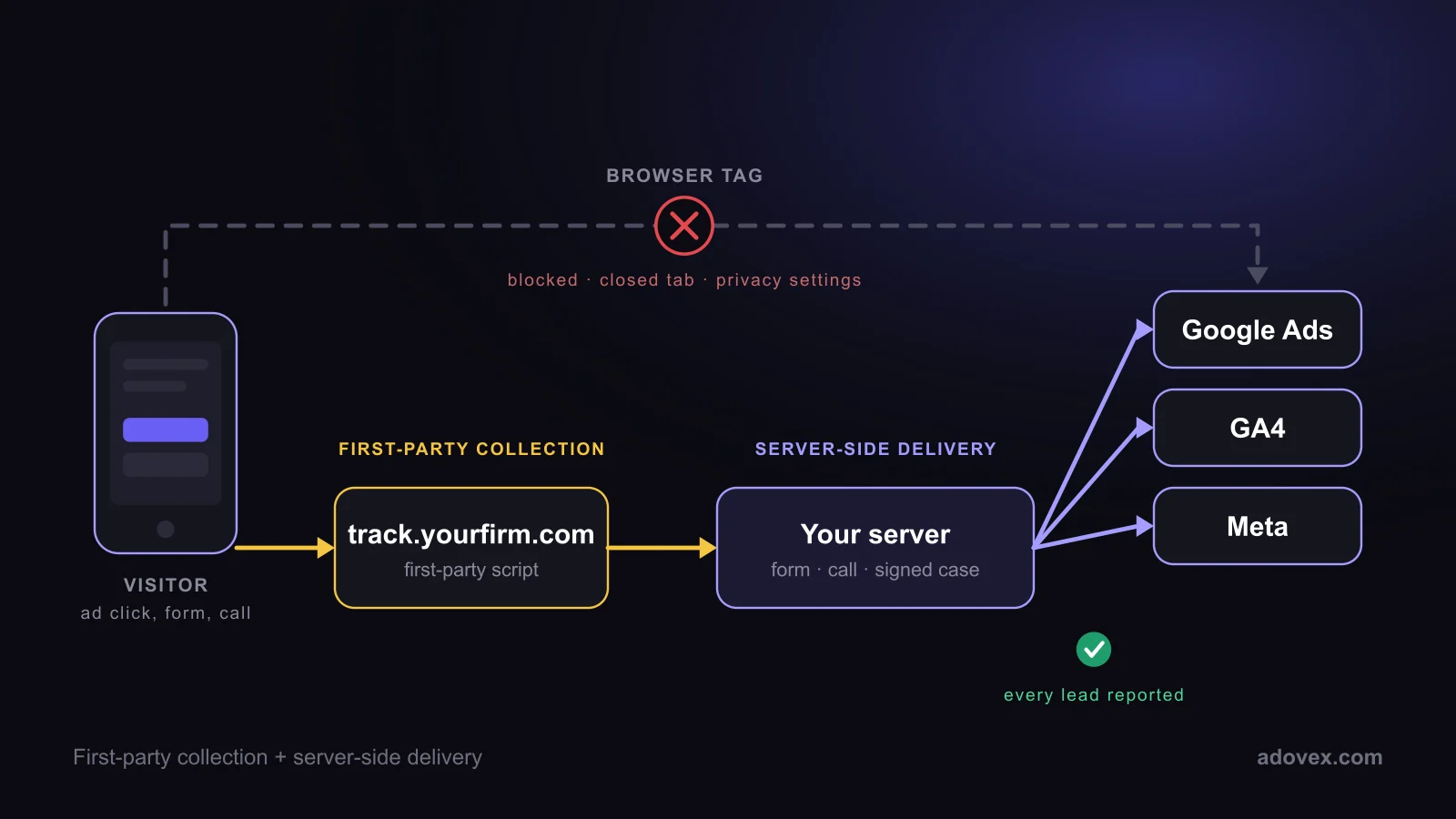
Short answer: First-party tracking means the tracking script and its data live on your firm’s own domain instead of an outside vendor’s. Server-side tracking means conversions are reported to Google Ads, GA4 and Meta by a server, not by a tag running in the visitor’s browser. A law firm needs both. First-party tracking collects more of the visits and calls. Server-side tracking makes sure every lead, and every signed case, actually reaches the ad platforms that decide where your budget goes.
Why tracking matters more for law firms than for most advertisers
Google and Meta bid on your behalf. Each time a click turns into a lead, the platform learns that the search, the audience and the ad were worth paying for. When a lead is never reported, the platform learns the opposite and moves your budget away from what was working.
That hurts law firms more than most businesses, for three reasons:
- Clicks are expensive. Injury, criminal defense and family law keywords are among the most expensive in Google Ads, so every misread lead is costly.
- Most leads are phone calls. A browser tag sees a form being filled out. It usually does not see a phone conversation that happens later.
- The real result happens weeks later. A lead is worth something only if it becomes a signed case, and that happens in your intake team or case management system, far from any browser.
What is first-party tracking?
First-party tracking is tracking that runs from your own domain, for example track.yourfirm.com, rather than from an advertising company’s domain. Browsers and privacy tools treat a script from the site the visitor is on very differently from a script loaded from someone else’s server. Safari, for example, limits cookies that scripts set and shortens them further when a visitor arrives from a link with tracking parameters (see WebKit’s tracking prevention documentation).
First-party tracking has two benefits. More visits are recorded with their source and ad click ID, and the data sits in an account the firm owns rather than in a vendor’s silo.
It is not a complete answer, though. Some privacy tools block first-party scripts too, and a script in the browser can only report what happens in the browser.
What is server-side tracking?
Server-side tracking moves the reporting step off the visitor’s device. A lead is recorded on a server first (a form submission, or a call on a tracking number), and then the server sends the conversion directly to the ad platforms using their official interfaces:
- Google Ads: enhanced conversions for leads and offline conversion imports, now sent through Google’s Data Manager API
- GA4: the Measurement Protocol
- Meta: the Conversions API
Because the report goes from server to server, an ad blocker, a closed tab or a phone’s privacy settings cannot stop it. It also means events that never happen in a browser can be reported, such as a phone call that lasted long enough to be a real inquiry, or a lead your intake team later signed.
First-party vs. server-side tracking: what is the difference?
They solve different halves of the problem. First-party tracking is about collecting the visit and its click ID. Server-side tracking is about delivering the conversion to the ad platforms.
| Setup | Where the script loads from | How conversions reach Google and Meta | Calls and signed cases |
|---|---|---|---|
| Standard pixels | The vendor’s domain | From the visitor’s browser | Usually not reported |
| First-party only | Your domain | From the visitor’s browser | Usually not reported |
| Server-side tagging (sGTM) | Your domain, through a tagging server | From the tagging server, relaying browser events | Only with custom work |
| First-party + server-to-server | Your domain | Directly from the server that recorded the lead | Reported, including signed cases |
Is server-side tagging (sGTM) the same thing?
Not quite. Server-side Google Tag Manager places a tagging server between the browser and the ad platforms. It is a real improvement over browser-only tags, but it still starts from events the browser sends. If the browser never sends the event, the tagging server never sees it. It also needs its own hosting and upkeep.
Server-to-server reporting starts from the record of the lead itself. The call log, the form submission and the outcome your intake team marks are the source, so nothing depends on a browser event arriving first.
What this changes for a law firm
- Google bids on your real leads. Smart bidding learns from the full set of leads, not only the ones that slipped past blockers.
- Calls count. A call from a paid click is matched to that click and reported like a form.
- Spend follows signed cases. When a lead signs, that outcome is reported too, so the platform learns which clicks become clients, not just which clicks become inquiries.
- Numbers you can reconcile. Google Ads, GA4 and your own lead records come from one source, so they stop contradicting each other.
Privacy: what actually gets sent
Server-side reporting should send the minimum. Contact details such as email and phone number are normalized and hashed with SHA-256 before they leave the server, which is the format Google and Meta require for matching. Each event carries an ID so the platform counts it once. Case details, notes and anything about the legal matter itself are never sent.
Questions to ask your agency
- Does our tracking script load from our own domain or from yours?
- Are our conversions reported from the browser, from a tagging server, or directly from a server?
- Are phone calls reported to Google Ads as conversions, and matched to the click?
- Does Google learn which leads became signed cases?
- Who owns the tracking data and the ad accounts if we leave?
How Adovex does it
Adovex runs first-party tracking on each firm’s own subdomain and reports every lead server-to-server: to Google Ads as enhanced conversions, to GA4 through the Measurement Protocol, and, for firms running Meta ads, to Meta through the Conversions API. Calls on the firm’s tracking numbers are matched to the ad click, and signed cases are reported back so bidding moves toward cases, not clicks. It is included in every plan. See how FirstTrack works.
Frequently asked questions
Do law firms need server-side tracking?
If the firm pays for Google or Meta ads, yes. Ad platforms bid based on reported conversions, and browser-only tracking misses leads to blockers, privacy settings and phone calls. Server-side tracking reports those leads directly, so bidding works from complete data.
Is first-party tracking enough on its own?
No. First-party tracking collects more visits and click IDs, but if conversions are still reported from the browser, the same blockers and closed tabs can stop the report, and calls and signed cases are still missing.
Does server-side tracking replace the Google tag?
No. The Google tag still helps record the visit and the ad click. Server-side reporting adds a second, more reliable path for the conversion itself, and each event carries an ID so it is not counted twice.
Can phone calls be tracked server-side?
Yes. A call on a tracking number is recorded by the phone system, matched to the visit and ad click that produced it, and reported to Google Ads from the server.
Is server-side tracking allowed under privacy rules?
It is the method Google and Meta recommend for sending conversion data, and contact details are hashed before they are sent. Firms should still disclose their tracking in their privacy and cookie policies and honor consent where it is required.
Last reviewed October 28, 2026.